
Teltonika · plug-in tracker
FMM003
A plug-and-play GPS tracker for cars, utes and vans. It plugs into the OBD-II port, runs on 4G LTE-M, and reads data straight from the vehicle.
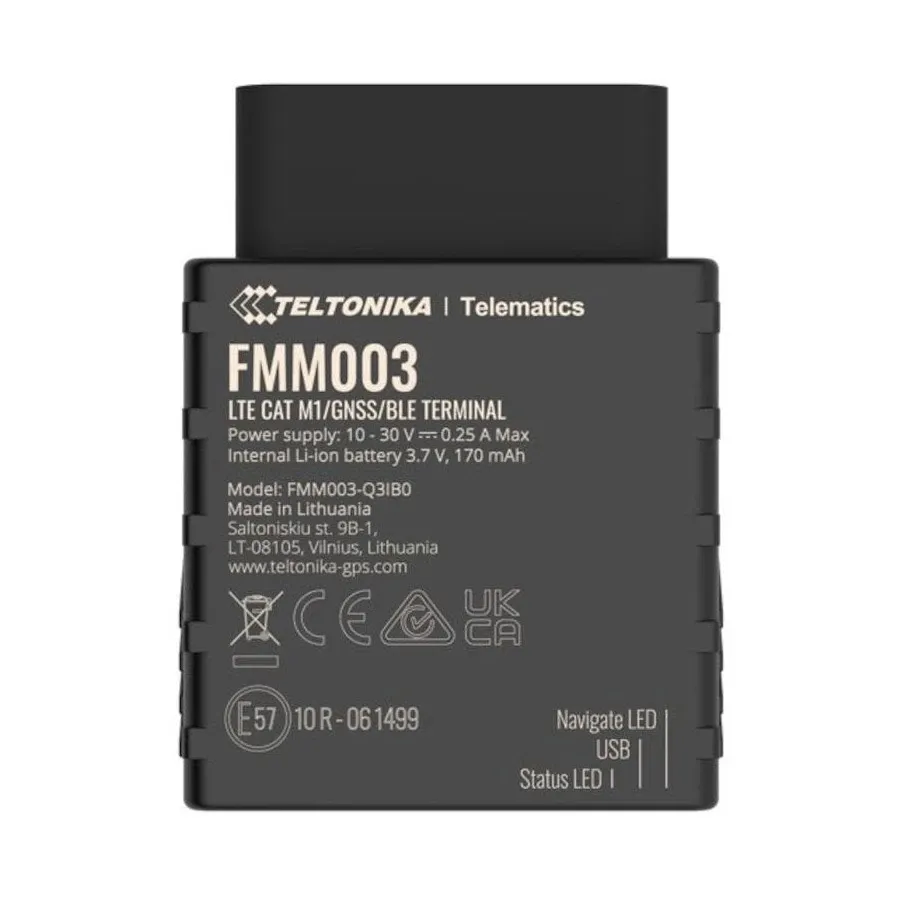
- LTE-M4G Cat-M1, including band 28 (700 MHz)
- 0wires to connect — it plugs into the OBD-II port
- 422,400records stored while out of coverage
- 170 mAhbackup battery for unplug alerts
In your vehicle
Plugs in. Reads the vehicle. Reports in.
Plugs in, no wiring
It goes into the OBD-II diagnostic port, usually under the dash on the driver’s side, on the extension cable we supply, so it can sit tucked out of sight. Nothing to cut, splice or drill.
Reads the vehicle’s own data
Through the OBD-II port it can read data from the vehicle’s computer — including the real odometer and fuel level on supported vehicles.
Reports over 4G LTE-M
Position, trips and alerts go to the platform over LTE-M. Out of range, it stores records and sends them when it’s back in coverage.
Specifications
Key specs
From Teltonika’s FMM003 documentation.
| Network | 4G LTE-M (Cat-M1), NB-IoT capable. LTE bands include B28 (700 MHz). Quectel BG95-M3 modem. |
|---|---|
| GNSS | Integrated receiver: GPS, GLONASS, Galileo, BeiDou and QZSS. Tracking sensitivity −165 dBm. |
| Vehicle interface | OBD-II port (CAN, K-Line). Reads data from the vehicle, including real odometer and fuel level on supported vehicles. |
| Bluetooth | Bluetooth 4.0 + LE |
| Backup battery | 170 mAh rechargeable, so it can still report after it is unplugged |
| Memory | 128 MB flash — about 422,400 records stored while out of coverage |
| Power | 10–30 V DC. About 35 mA average in normal use; about 4.5 mA in deep sleep (at 12 V). |
| Physical | 63 g; 67.2 × 49.6 × 25 mm. Operating temperature −40 to +85 °C without battery; −20 to +40 °C with battery. |
| Protection | Jamming detection, movement sensor (accelerometer), over-voltage protection |
| Management | Remote configuration and over-the-air firmware updates — we manage these for you |
On the platform
What you get with an FMM003.
Every FMM003 comes onto the We Track IT platform. Here’s what it does there.
Live tracking
- Live map of your whole fleet
- Status for each vehicle: moving, idling with the ignition on, or parked
- Last known location, even when a vehicle is out of coverage
Trips and history
- Trips start and stop automatically
- Trip detail and playback on the map
- Mileage per vehicle and across the fleet
- Daily summary for each vehicle
Logbook
- Every trip recorded automatically, with its distance and times
- Trips marked as Business, Personal or Commute
- Logbook automation, so trips are marked for you
Speeding
- Device speed limit that you set
- Posted road speed limits
- One speed limit across your whole account
- Speed limits inside particular zones, such as a yard or a mine site
- Maximum speed recorded inside a zone
Driver behaviour
- Harsh braking
- Harsh acceleration
- Harsh cornering
- Excessive idling
- Engine over-revving (needs the vehicle to report engine RPM)Depends on vehicle
Geofences
- Circle and polygon zones
- Locations — alerts on enter and exit
- No-go zones and keep-in zones
- Routes — alerts when a vehicle goes off route
- Points of interest (POI), and zones uploaded from a GPX file
- Zone overstay — a vehicle stays too long
- Entering or leaving a country, state or town
Security and tamper alerts
- Tracker unplugged from the vehicle
- Tow alert — vehicle moved with the ignition off
- Impact event
- Mobile signal jamming detected
- Vehicle battery low or disconnected
- Tracker backup battery low
- SIM swap
Vehicle data
Depends on vehicle
- OBD reports from the vehicle
- Fault codes (DTC)
- Engine overheating alerts
- Fuel level
- Odometer and working-hours (engine hours) adjustment, so the platform matches the dash
- EV charging start and stop
Maintenance
- Maintenance items for each vehicle
- Scheduled by date, kilometres or engine hours
- Odometer and engine hours adjustable to match the dash, so services fall due at the right time
Alerts
- Alert rules for your account, with priorities
- Email, SMS, on-screen and push notifications
- Send alerts to other people as well as yourself
- SMS alerts use your account’s SMS allowance
Fleet organisation
- Your own vehicle names and IDs
- Groups — by depot, crew, region or job
- Activation and deactivation dates for each vehicle
- Work modes, and clock in / clock out
On your phone
- Install it on your home screen straight from the browser
- Opens full screen, like any other app
- Nothing to download from an app store, and nothing to update
Sharing
- Share a vehicle’s live location by link
Tracker settings decide which alerts fire. We set them up and manage them for you. Driver ID, immobilisers and extra sensors need other hardware — see all features.
Install
In and reporting in four steps.
Find the port
The OBD-II port is usually under the dash on the driver’s side. Your owner’s manual shows where.
Plug it in
Plug the extension cable into the port and the tracker into the cable. Tie the tracker up out of the way of your feet.
Start and drive
Start the engine and drive for a few minutes so the tracker gets a GPS fix and connects.
Check the map
Log in to the dashboard. The vehicle should be on the map.
Compatibility
Will it work in my vehicle?
The FMM003 works with most vehicles that have an OBD-II port. GPS location, trips and speed come from the tracker itself, so they don’t depend on the vehicle.
What it can read from the vehicle — real odometer, fuel level and fault codes — depends on the make and model. Some vehicles share all of it, some share part, some share none.
Check with us before you order, especially for trucks, older vehicles, EVs and anything unusual. Teltonika also publishes anOBD supported vehicle list.
FAQ
FMM003 questions
Do I need an auto electrician to fit it?
No. The FMM003 plugs into the vehicle’s OBD-II diagnostic port, usually under the dash on the driver’s side, using the extension cable that comes with every tracker. The cable lets you tuck the tracker up out of the way. There is no wiring. Most people have it in and reporting in a few minutes. If you’d rather we fit it, we can install for a fee.
Will it work in my vehicle?
It works with most vehicles that have an OBD-II port. What it can read from the vehicle — real odometer, fuel level and fault codes — depends on the make and model, so check with us before you order, especially for trucks, older vehicles and anything unusual.
What happens when the vehicle is out of coverage?
The tracker keeps logging. It stores records in its memory and sends them when it is back in range, so trips out bush still show up in your history.
Which mobile network does it use?
It runs on 4G LTE-M (Cat-M1), including band 28 (700 MHz). Band 28 is a low-frequency band, and lower frequencies carry further — useful in regional and remote areas.
Will it flatten my vehicle battery?
It draws very little power, and it can drop into a low-power sleep mode when the vehicle is parked. If a vehicle will sit for weeks, or its battery is small or old, talk to us about settings.
What if someone unplugs it?
It has a small backup battery, so it can send an unplug alert to the platform. Mechanics often unplug the tracker’s cable from the port during a service — just plug it back in afterwards.
Who looks after firmware and settings?
We do. We look after the tracker’s settings and firmware updates remotely, so you don’t have to.
Ready to plug in?
Tell us what you drive and how many vehicles you run. We’ll come back to you with a quote.