
Tracker offline or not reporting
A vehicle that hasn’t moved on the map for a while isn’t always a fault. Most of the time the vehicle is parked, out of coverage, or the tracker has been knocked loose. Work through this checklist before you call.
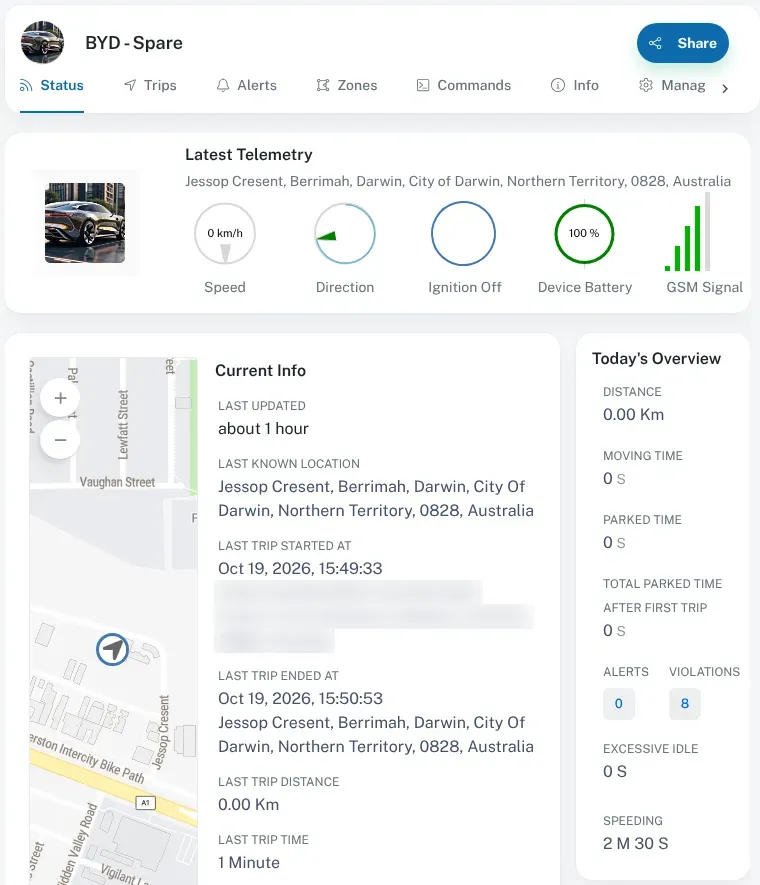
First, find when the vehicle last reported. Open the vehicle on the live map and look at its last known location and the time it was recorded. Or go to Asset Info, select the vehicle, and look at Current Info on the Status tab. It shows Last Updated, Last Known Location, and when the last trip started and ended.
Checklist
Section titled “Checklist”-
Has the vehicle been driven since it last reported? When a vehicle is parked with the ignition off, the tracker goes into a low-power sleep mode and reports much less often. That is normal and saves the vehicle’s battery. It wakes up again when the vehicle moves or the ignition comes on. If the vehicle hasn’t been driven, start it and drive for a few minutes, then check again. We set the sleep settings for you.
-
Has it been out of coverage? Out of mobile coverage, the tracker keeps recording and stores the records. It sends them once it’s back in range, so the trip appears later, all at once. If the vehicle is out bush, wait until it’s back in coverage. See coverage.
-
Has the tracker been unplugged or knocked loose? Check your alerts for an unplug alert. Then look under the dash. Is the extension cable pushed all the way into the OBD-II port, and the tracker all the way into the cable? Could a driver’s feet have knocked it? If either is loose, push it firmly back in. See unexpected unplug or tow alerts.
-
Are the lights on? The tracker has two lights. If both are off, it may have no power. If the navigation light stays on solidly, it can’t get a GPS signal. Our LED status guide explains each pattern.
-
Is the vehicle’s battery flat or disconnected? The tracker runs on the vehicle’s power. If the battery has been disconnected, or has gone flat, the tracker will stop once its small backup battery runs down. Look for a vehicle power alert in your alerts.
-
Has the vehicle just been serviced, or the tracker moved? Mechanics often unplug the tracker’s cable to use the OBD-II port and forget to plug it back in. If you have moved the tracker to a different vehicle yourself, tell us so we can update your account. See servicing and unplugging and moving a tracker.
-
Is the vehicle still active on your account? Vehicles can have activation and deactivation dates. If the vehicle’s deactivation date has passed, that could explain it. Contact us and we’ll check.
Still not reporting?
Section titled “Still not reporting?”Contact us or call us. To help us find the problem quickly, have this ready:
- the vehicle’s name or ID as it shows on the dashboard
- when it last reported, and where
- whether it has been driven since
- what the tracker’s lights are doing, if you can get to the vehicle
- anything that changed recently, such as a service, a new battery or a new accessory in the OBD-II port
We manage trackers remotely, so we can often check what’s going on from our end.