
Servicing and unplugging
The FMM003 connects to the vehicle’s OBD-II port through its extension cable. That port is also where mechanics and auto electricians plug in their scan tools. So when a vehicle goes in for a service, there’s a good chance someone will unplug the cable — and you’ll get an unplug alert.
That’s normal. The thing to watch is that it goes back in afterwards.
Before a service
Section titled “Before a service”- Tell your mechanic the tracker is there. A note on the job card works: “GPS tracker cable in the OBD port — please plug it back in when finished.”
- Expect an unplug alert while the vehicle is in the workshop. If your team gets these alerts too, let them know the vehicle is booked in so nobody panics.
Unplugging and plugging back in
Section titled “Unplugging and plugging back in”Teltonika says the ignition must be off before the tracker is disconnected from the vehicle. Have it off when you plug it back in, too.
- Turn the ignition off.
- Pull the extension cable’s plug straight out of the vehicle’s port. Don’t lever it sideways. Leave the tracker connected to the cable and tied up where it is.
- When the work is done, with the ignition off, push the cable’s plug firmly back into the port until it’s fully seated.
- Start the engine and drive.
If the tracker itself has to come out — for example, for work behind the dash — keep it on its cable and put it somewhere it won’t get lost or wet, not loose in the footwell. A lost or water-damaged tracker costs money to replace. Tie it back in place afterwards. See Installing your FMM003.
Check it’s reporting again
Section titled “Check it’s reporting again”After the vehicle comes back from the workshop:
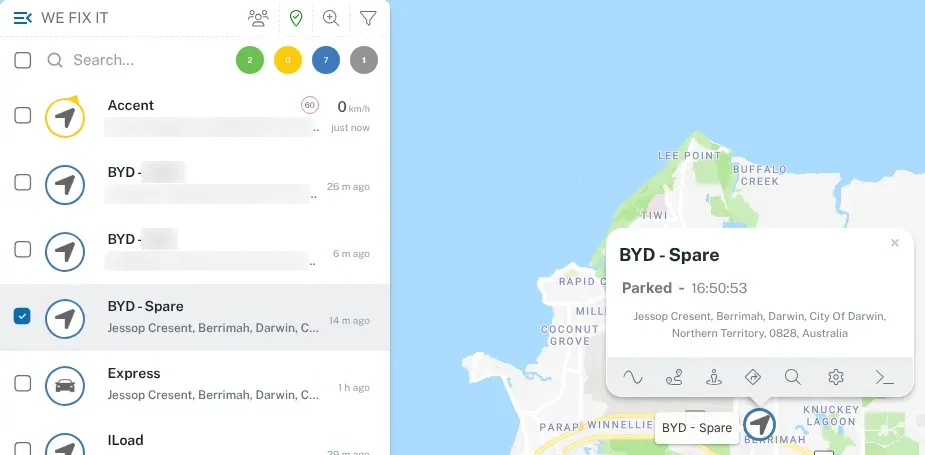
- Log in to the dashboard.
- Find the vehicle on the live map and check its last update time is recent.
- If the vehicle has been driven since the service but the last update is from before the service, the tracker probably hasn’t gone back in properly.
It’s worth a quick look at the tracker’s lights too. See what the lights mean.
Use a Y-splitter if it happens a lot
Section titled “Use a Y-splitter if it happens a lot”If a vehicle is often on the diagnostic tool — or your own team plugs in a scan tool — an OBD-II Y-splitter cable can help. The tracker’s cable stays plugged into one side, leaving a spare OBD-II socket free for the scan tool. Teltonika lists a Y-splitter as an accessory for this tracker.
Ask us if you think one would help.
Unplug alerts you weren’t expecting
Section titled “Unplug alerts you weren’t expecting”An unplug alert when nobody has been near the vehicle is worth checking. The tracker may have worked loose, been knocked by a boot, or been removed. See unexpected unplug or tow alerts.
Selling or returning a vehicle
Section titled “Selling or returning a vehicle”Take the tracker and its extension cable out before a vehicle is sold, traded in or handed back at the end of a lease — ignition off, as above. You can move it to another vehicle. Then update the vehicle details in the platform, or tell us, so the map shows the right vehicle. See moving a tracker to another vehicle.