
Sharing a vehicle’s live location
Sometimes someone outside your business needs to know where a vehicle is. A customer waiting on a tradie. A site manager expecting a delivery. A family member of a staff member driving a long remote run. The platform lets you share a vehicle’s live location by link, so they can see it on a map without needing a login.
When sharing helps
Section titled “When sharing helps”- Customers — “Your technician is on the way” is better with a map.
- Contractors and site managers — see when a vehicle is getting close to site.
- Remote travel — someone back in town can keep an eye on a vehicle on a long trip.
- Breakdowns — show a tow operator or roadside assistance exactly where the vehicle is.
Share a vehicle’s location
Section titled “Share a vehicle’s location”- Log in to the dashboard.
- Go to Asset Info and select the vehicle from the list.
- Click Share. In the Share Live Location window, set the Expiry Date, then click Save Changes.
- Copy the link. It’s listed on the vehicle’s Sharing tab, under Active Links.
- Send the link to the person who needs it — by text, email or however you normally contact them.
The person opens the link and sees where the vehicle is.
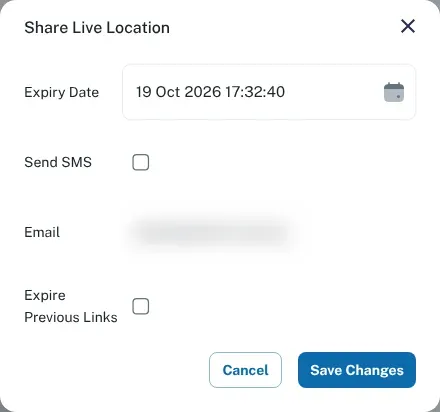
Each link stops working at the expiry date you set. The vehicle’s Sharing tab lists its Active Links and Expired Links. To end a vehicle’s older links when you share it again, tick Expire Previous Links.
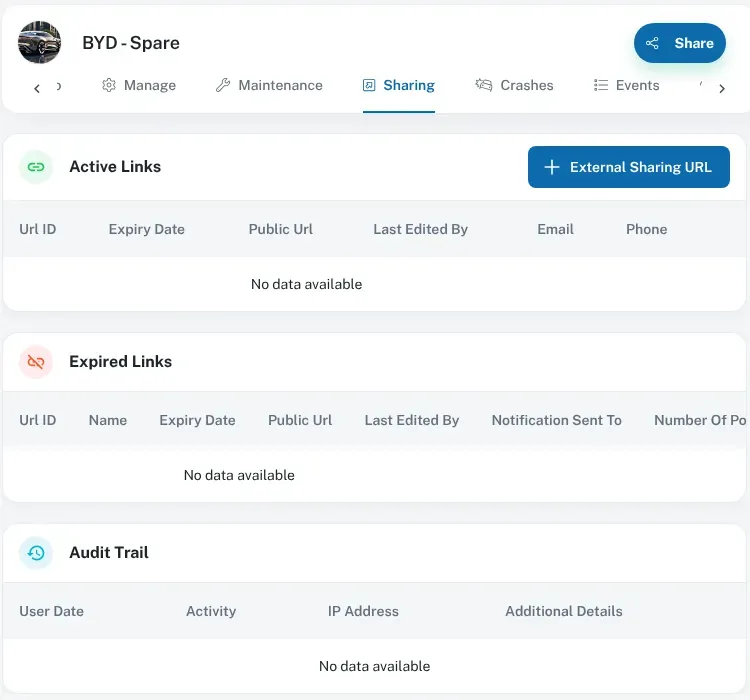
The Audit Trail on the same tab records activity on the vehicle’s share links.
Share sensibly
Section titled “Share sensibly”A shared link shows where a vehicle is, and often where a person is too. A few good habits:
- Share only what’s needed. Share one vehicle, not your fleet.
- Share only for as long as it’s needed. When the job or trip is done, stop sharing if you can. If you’re not sure how, contact us.
- Send it to the right person. Anyone with the link can see the vehicle, so treat it like a key. Don’t post it publicly.
- Tell the driver. Let your driver know their vehicle’s location is being shared, and with whom.
Privacy
Section titled “Privacy”Sharing location is a privacy decision as well as a convenience. Before you share a vehicle that someone drives, make sure it fits with what you’ve told your staff about tracking. See tracking your staff for general information, and our privacy policy for how we handle data.
Can’t find the option?
Section titled “Can’t find the option?”Contact us and we’ll help you share the vehicle you need.