
Unexpected unplug or tow alerts
Unplug, tow and impact alerts are there to catch theft and tampering. Sometimes they fire for everyday reasons. Here’s what usually causes them, and what to do.
Unplug alerts
Section titled “Unplug alerts”The tracker raises an unplug alert when it loses power from the vehicle. It has a small backup battery, so it can still send the alert after it’s unplugged. It also reports when power comes back.
Common causes:
- A service or repair. Mechanics often unplug the tracker’s cable to use the OBD-II port for diagnostics. This is the most common cause. See servicing and unplugging.
- A loose fit. If the extension cable isn’t pushed all the way into the port, or the tracker all the way into the cable, it can lose contact over bumps.
- Knocked by feet. If the tracker is hanging loose instead of tied up under the dash, a boot can knock it, or pull the cable half out. Tie it up out of the way. See installing the FMM003.
- Something else in the port. Code readers, dash displays and other accessories that plug into the OBD-II port mean the tracker has to come out.
- Vehicle battery work. Disconnecting or replacing the vehicle battery cuts power to the tracker.
If you get an unplug alert you can’t explain, check the vehicle. If the cable or the tracker is out, plug it back in with the ignition off.
Tow alerts
Section titled “Tow alerts”A tow alert means the vehicle moved while the ignition was off. It’s meant to catch a vehicle being taken away on a truck or dragged off. It can also fire when:
- the vehicle is carried on a tilt-tray or car carrier — for example, when it goes to or from a workshop
- the vehicle is on a barge or ferry
- the vehicle is pushed, or rolled with the engine off
- the vehicle is lifted on a workshop hoist
If you know the vehicle was moved, you can ignore the alert. If you don’t, check where it is on the live map straight away.
Impact alerts
Section titled “Impact alerts”An impact alert means the tracker felt a sharp jolt. Hard hits on potholes, corrugations, kerbs and rough tracks can trigger it as well as a collision. If you see one, check with the driver.
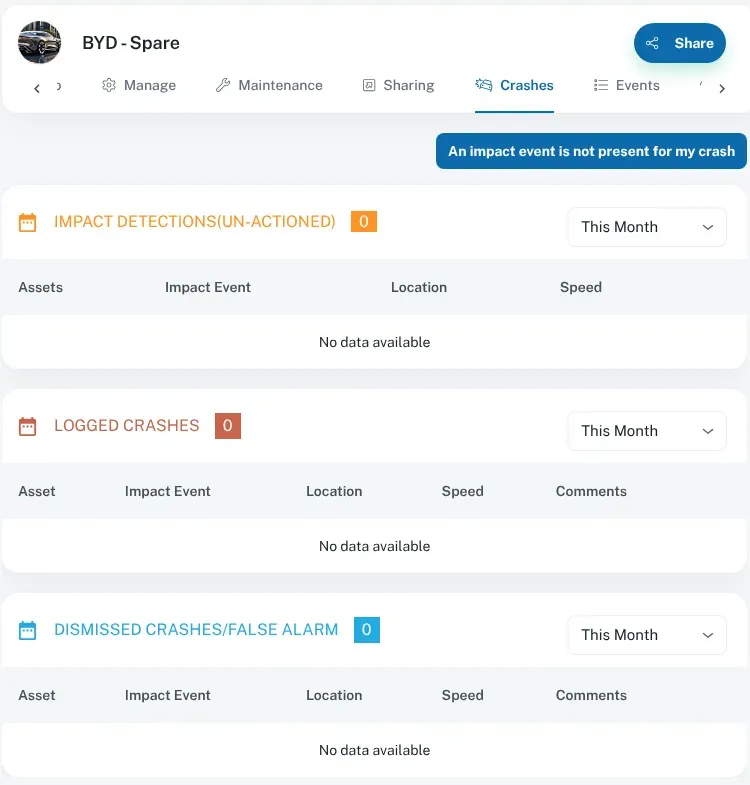
Impact events also appear on the vehicle’s Crashes tab in Asset Info. It lists Impact Detections (Un-actioned), Logged Crashes and Dismissed Crashes/False Alarm.
To get an alert when a tracker is unplugged, create a rule with the Main Power Supply Disconnected (Int Batt Only) trigger. It’s under Triggered Events > Power & Battery Events. See Alerts and notifications.
If alerts keep coming
Section titled “If alerts keep coming”What the tracker treats as an unplug, a tow or an impact depends on its settings. We set these up and manage them for you. If one vehicle keeps raising alerts that aren’t real — say, a ute that spends its life on rough roads — contact us and we can review its settings.
When you call, tell us:
- the vehicle
- the dates and times of the alerts
- what the vehicle was actually doing at the time
See also: alerts and notifications.