
Position wrong or jumping around
The tracker works out its position from satellite signals (GNSS — GPS and other satellite systems). Most of the time that is accurate to a few metres. When the signal is blocked or bounced around, the position can drift or jump. Here’s why, and what to do.
Common causes
Section titled “Common causes”No clear view of the sky
Section titled “No clear view of the sky”Satellite signals don’t pass through solid roofs or much metal. Positions are less reliable when the vehicle is:
- inside a shed, workshop or garage
- under a carport or a fuel-station awning
- in an underground or multi-level car park
- between tall buildings
- under heavy tree cover
Signals can also bounce off buildings and large metal structures before they reach the tracker. That can put the vehicle across the road or in the next block.
Drifting while parked
Section titled “Drifting while parked”A parked vehicle in a poor-signal spot can appear to wander a little on the map, or show small movements when nothing has moved. This is the position estimate shifting, not the vehicle. It usually settles once the vehicle drives back into the open.
The first position after a long sleep
Section titled “The first position after a long sleep”When a vehicle has been parked for a long time, the tracker sleeps to save power. When the vehicle starts again, it can take a short time to get a fresh satellite fix. The first few points of a trip can be a little out until it does.
Data arriving late
Section titled “Data arriving late”If the vehicle was out of mobile coverage, the tracker stored its records and sent them when it got back in range. Those points then appear on the map all at once. That can look like a jump, but the history fills in correctly. See coverage.
Where the tracker sits
Section titled “Where the tracker sits”The FMM003 has its satellite receiver built in. If the tracker is tied up deep under the dash, boxed in by metal, reception is weaker. Its extension cable gives you room to move it somewhere with a better view of the sky, such as behind plastic trim. See installing the FMM003.
What you can do
Section titled “What you can do”-
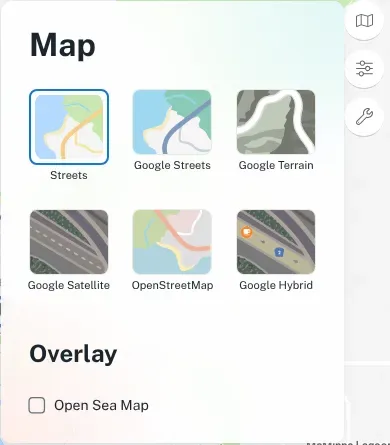
Check the map in satellite view. Click the map button on the right of the map and choose Google Satellite or Google Hybrid. Compare it with where the vehicle actually was.
-
Look at a full trip in trips and history, not a single point. One odd point in an otherwise good trip is usually a signal problem.
-
Check the navigation light. If it stays on solidly, the tracker isn’t getting a satellite signal. See LED status.
-
Note where it happens. If it’s always the same depot or shed, the building is the likely cause.
When to call us
Section titled “When to call us”Contact us if:
- positions are wrong out in the open as well as near buildings
- the vehicle shows a long way from where it really is
- the problem started suddenly and keeps happening
Tell us the vehicle, the date and time, and where it actually was. We can check the tracker’s data and settings remotely.