
Driver behaviour
Driver behaviour events show how vehicles are being driven, not just where. They help you spot the habits that wear out brakes and tyres, burn fuel and lead to crashes.
What’s recorded
Section titled “What’s recorded”| Event | What it means |
|---|---|
| Harsh braking | The vehicle slowed down much faster than normal. Often a sign of following too close or not reading the road ahead. |
| Harsh acceleration | The vehicle sped up much faster than normal. Hard on the engine, the tyres and the fuel bill. |
| Harsh cornering | The vehicle went around a corner or roundabout too fast. Rough on loads and tyres, and a rollover risk in high vehicles. |
| Excessive idle | The engine has been running with the vehicle stopped for too long. Burns fuel and adds engine hours for nothing. |
| Engine over-revving | The engine is being revved too high. |
Harsh braking, acceleration and cornering are usually detected by the tracker’s movement sensor. For them to be accurate, the tracker needs to be fitted firmly so it doesn’t move around. See Installing the FMM003.
Where to see it
Section titled “Where to see it”- Trips. Each trip in Trips shows its Speeding time, Max Speed, Avg Speed and Idling time. Each day has a Score For This Day, and the graph under the map has an Eco Driving Details tab. See Trips and history.
- Asset Info. The Status tab’s Today’s Overview shows the vehicle’s Violations, Excessive Idle and Speeding for the day.
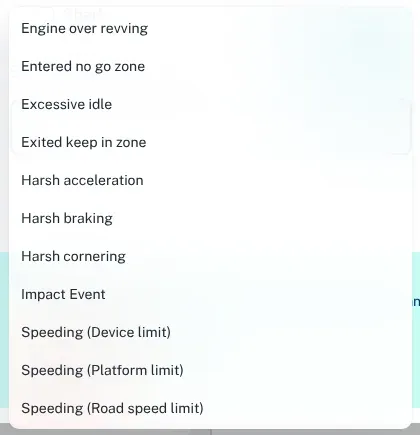
- Reports. The Violation Report lists events across the fleet. Under Select Violation Type/s, pick the events you want.
You can also get alerts for them.
Set up alerts
Section titled “Set up alerts”- Log in at dashboard.wetrackit.com.au.
- Go to Alerts and click Create Alert. Under Alert Trigger, pick the event you care about.
- Under Select Assets, choose the vehicles. Under Notify me and Notify Others, choose who should hear about it.
See Alerts and notifications for the details. For most fleets, a weekly look at the events works better than an SMS for every harsh brake.
Use it for coaching, not punishment
Section titled “Use it for coaching, not punishment”Driver behaviour data works best when drivers see it as fair. Some tips:
- Tell your team first. Explain what’s tracked and why — safety, fuel and wear on the vehicles. See Tracking your staff.
- Look for patterns, not one-offs. A single harsh brake might be a kangaroo on the road. Ten a day is a habit.
- Check the context. Play the trip back. Corrugated dirt roads, roundabouts and heavy traffic all affect the numbers. See Trips and history.
- Talk one-on-one. Show the driver the trip and ask what happened before drawing conclusions.
- Recognise improvement. Notice when a driver’s numbers come down, and say so.
Excessive idle in the Territory
Section titled “Excessive idle in the Territory”In the heat, people often leave the engine running for the air conditioning. That’s understandable, but it adds up. Check the idling time on each trip to see which vehicles idle the most, then decide together what’s reasonable — for example, idling is fine for a few minutes while loading, but not for a long lunch break.