Trips split or merged oddly
The platform records trips automatically. A trip starts when the vehicle starts moving with the ignition on, and ends when it stops. Most of the time that matches what the driver did. Sometimes one journey shows as two or three trips, or a day of short jobs shows as one long trip. Here’s why.
How the tracker knows a trip has started
Section titled “How the tracker knows a trip has started”To start and end a trip, the tracker has to know whether the ignition is on and whether the vehicle is moving. A plug-in tracker can’t see the ignition key, so it works it out from what it can sense, such as:
- the vehicle’s electrical voltage, which rises when the engine is running
- movement, from its built-in motion sensor
- engine speed (RPM), on vehicles that share it
Which method suits a vehicle depends on the vehicle. We choose and manage these settings for you.
Why trips get split
Section titled “Why trips get split”One journey can show as several trips when:
- the vehicle stops for a while mid-journey — a long wait at roadworks, a stop for fuel or a long red light can look like the end of a trip
- the engine is switched off briefly — for example, at a delivery
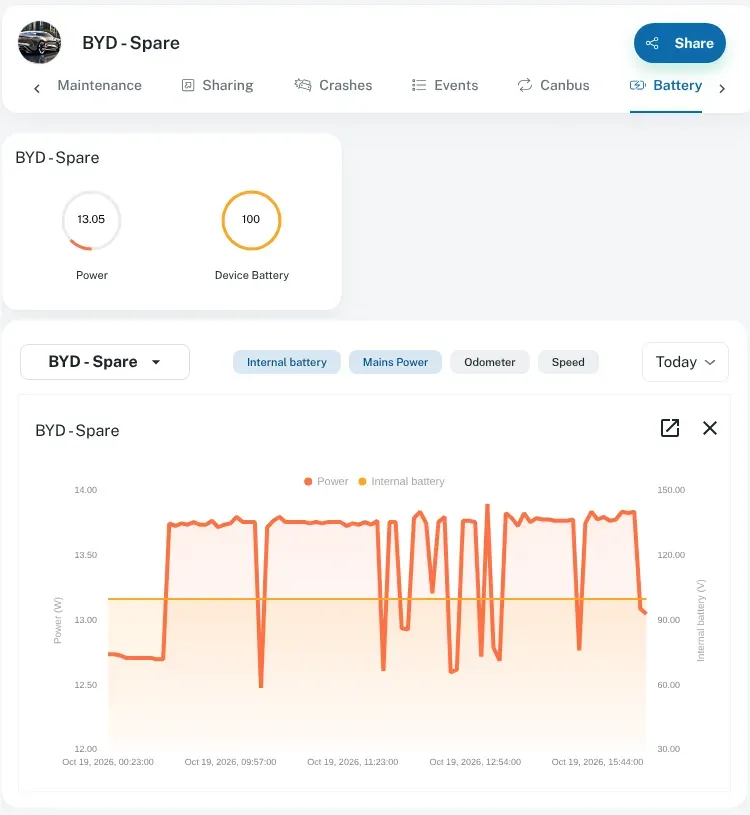
- the vehicle’s voltage drops — some vehicles, especially ones with stop-start engines or smart alternators, have a voltage that can look like the engine is off when it isn’t
- there was a coverage gap — records stored out of range are sent later and fill in the trip, but the trip may show differently until they arrive. See coverage.
Why trips get merged
Section titled “Why trips get merged”Several stops can show as one trip when:
- the engine keeps running at each stop — a ute left idling at each job looks like one long trip with some idle time
- the stops are short — quick stops may not be long enough to count as the end of a trip
Idling isn’t lost when this happens. The platform records idle time, and long idling can raise an excessive-idle alert. See driver behaviour.
What you can do
Section titled “What you can do”- Look at the whole day in trips and history and play it back on the map. It’s often clearer than the trip list. Tick Show zero distance trips to include very short trips in the list.
- Check the daily summary. Total distance and time for the day are usually right, even when the trip boundaries look odd. See reports.
- Note some examples. Write down the vehicle, the date and roughly when the trips should have started and ended.
- Contact us with those examples. We can look at how that vehicle signals its ignition and adjust the tracker’s settings for it.
To see a vehicle’s voltage, go to Asset Info, select the vehicle and open the Battery tab. The graph shows the vehicle’s Power through the day. It rises when the engine runs and drops when it stops, which is what many trackers use to tell when a trip starts and ends.