
Speeding
The platform can check vehicle speed against several kinds of limit. You don’t have to use them all. Pick the ones that answer the questions you actually get asked.
The kinds of limit
Section titled “The kinds of limit”| Limit | What it checks | Good for |
|---|---|---|
| Device speed limit | A single top speed set on the tracker. | A hard ceiling, such as 110 km/h for a light vehicle or lower for a loaded truck. |
| Posted road speed limits | The vehicle’s speed against the signed limit for the road it’s on. | Catching 80 in a 60 zone through town, which a single top speed would miss. |
| Platform speed limit | One limit applied across your whole account. | A simple company-wide rule. |
| Zone speed limits | A limit inside a zone you’ve drawn. | Yards, depots, mine sites and community roads with low limits. |
| Max speed in zone | The highest speed reached inside a zone. | Checking compliance on a site without an alert every time. |
Device speed limit
Section titled “Device speed limit”The device speed limit is set on the tracker itself. We manage tracker settings, so contact us to set or change it.
Posted road speed limits
Section titled “Posted road speed limits”Posted road speed limits are the most useful for most fleets, because they reflect where the vehicle actually is. The same 70 km/h is fine on the highway but too fast past a school.
Zone speed limits
Section titled “Zone speed limits”To set a limit for a zone:
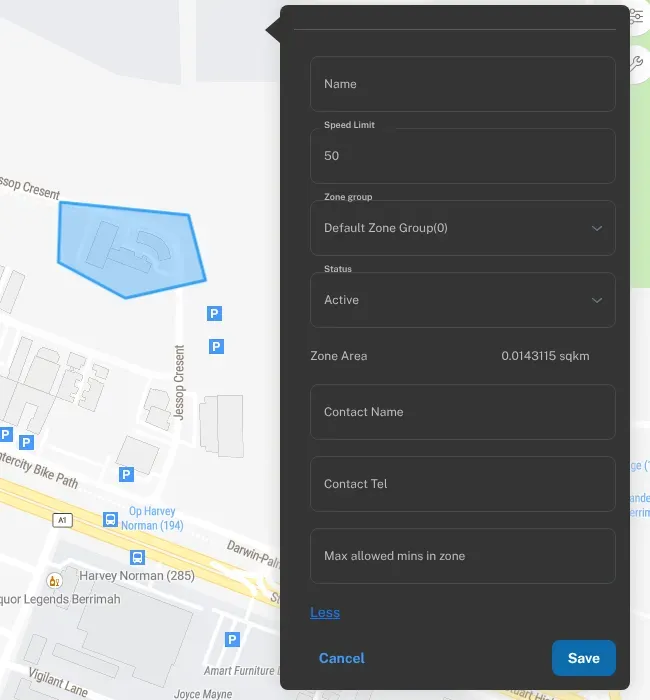
- Draw the zone, or open an existing one. See Geofences.
- Enter the limit in the zone’s Speed Limit field.
- Save it, and set up an alert rule if you want to be told when it’s broken.
Get alerts for speeding
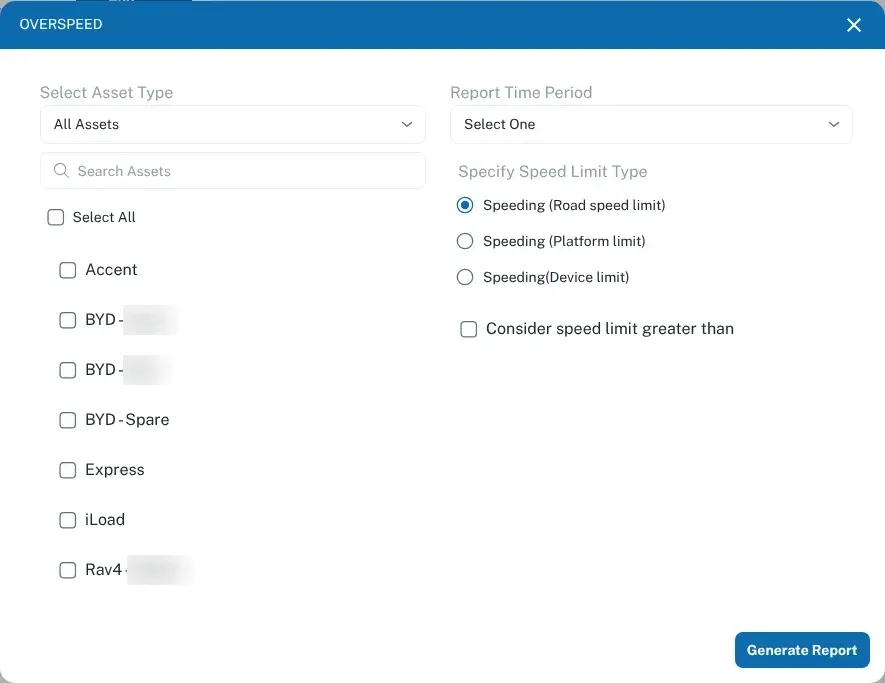
Section titled “Get alerts for speeding”Speeding events are recorded against the trip. Each trip in Trips shows its Speeding time and Max Speed, and the Overspeed report lists every event with the speed and the limit. When you run it, choose Speeding (Road speed limit), Speeding (Platform limit) or Speeding(Device limit). See Reports.
For alerts, the Alert Trigger list includes Overspeed - road speed limit and Overspeed - Device Speed Limit. To be told when they happen, set up an alert rule for the kind of limit you care about. See Alerts and notifications.
Using speed data sensibly
Section titled “Using speed data sensibly”- Pick one main rule first. Posted road limits, or a sensible device limit, is enough for most fleets to start with.
- Look for patterns. One brief event overtaking a road train is different from a driver who’s over the limit every afternoon.
- Talk to drivers early. Show them the trip and the speeds. Most people slow down once they know it’s being looked at.
- Be clear up front. Tell your team you track speed, and why. See Tracking your staff.